Key takeaways
- DM automation uses triggers, saved responses, or AI chatbots to automatically reply to direct messages on social media, saving time and enabling 24/7 customer support.
- The most effective setups combine AI-powered chatbots for routine inquiries with easy escalation to human agents for complex issues.
- Every major platform handles DM automation differently. Instagram and Facebook offer native tools, while X, LinkedIn, and TikTok require third-party solutions.
- A DM automation CTA (like commenting a keyword on a Reel to trigger a DM) is one of the fastest-growing tactics for driving conversions directly from social content.
What is DM automation?
An automated DM is a pre-set response that is automatically sent as a reply to people who send you a direct message on social media. In 2026, it matters more than ever. Message volume keeps climbing across platforms, AI chatbots have matured enough to handle real conversations, and customers now expect near-instant answers no matter the hour.
Common types of messages to automate include answers to frequently asked questions, delivering a digital file or link, or answering straightforward questions like requests for delivery tracking updates.
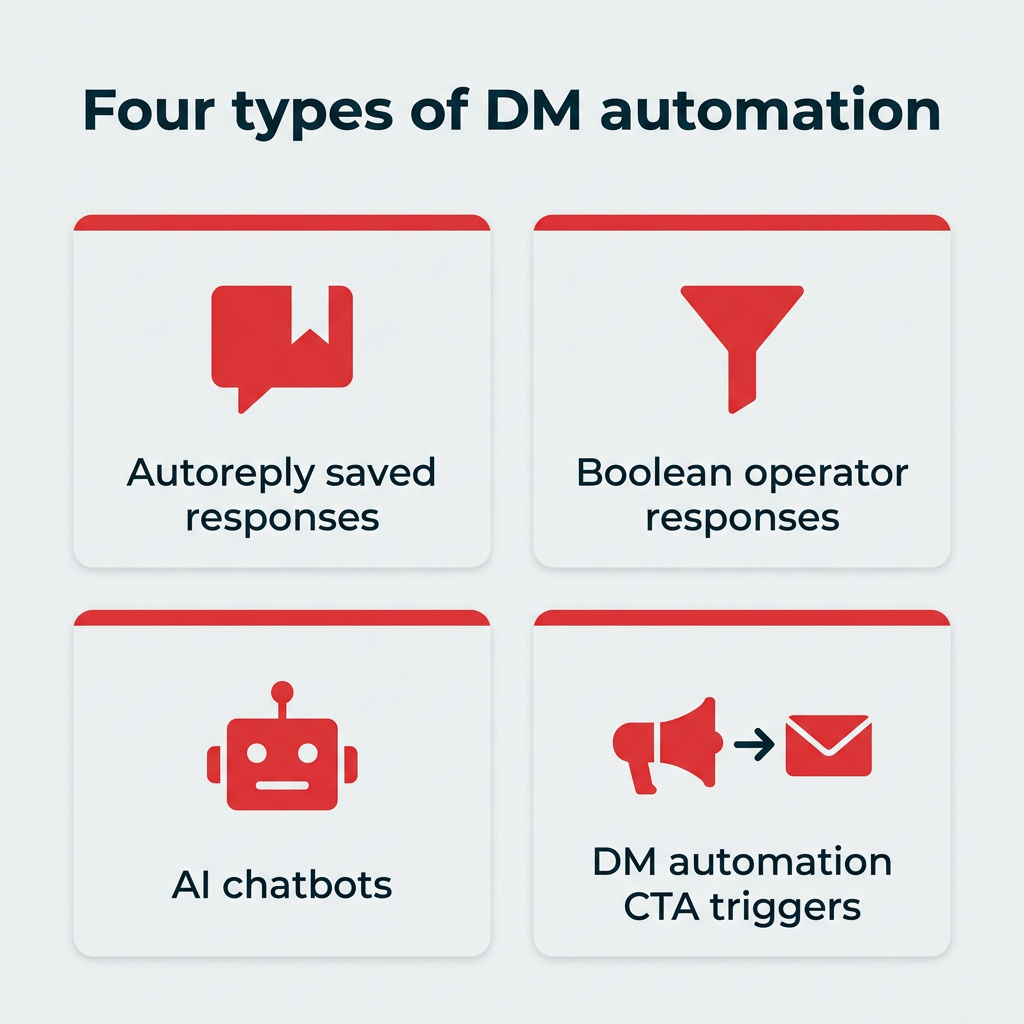
Most DM automation is done with chatbots, but not all. There are four types of DM automations out there:
- Autoreply saved responses: Also known as “canned responses,” these are pre-written statements that can automatically reply to specific, pre-defined keywords.
- Boolean operator responses: Boolean operators are words “and,” “or,” and “not.” Autoresponders that use booleans are triggered when a certain set of conditions is met. For example, you can set up a response about holiday shipping times to automatically go out when a DM that uses phrases like “shipping” AND (“holidays” OR “Christmas”) is detected.
- AI chatbots: These AI chatbots use conversational AI models to interpret what someone is asking for and create a custom response unique to that specific scenario. They can also carry on a conversation, remembering details from earlier messages in the same thread.
- DM automation CTA triggers: A newer type where a call-to-action prompts users to comment a keyword on a post or Reel, which automatically triggers a DM with a link, code, or resource. We cover this in detail below.
Bonus: Save time and download 20 free, customizable Instagram DM templates for your brand, including greetings, partnership requests, FAQ responses, replies to complaints, and more.
How does DM automation work?
At its core, DM automation follows a simple trigger-action loop. Something a user does sets off a rule, the system decides how to respond, and a message is sent, all without a human lifting a finger.
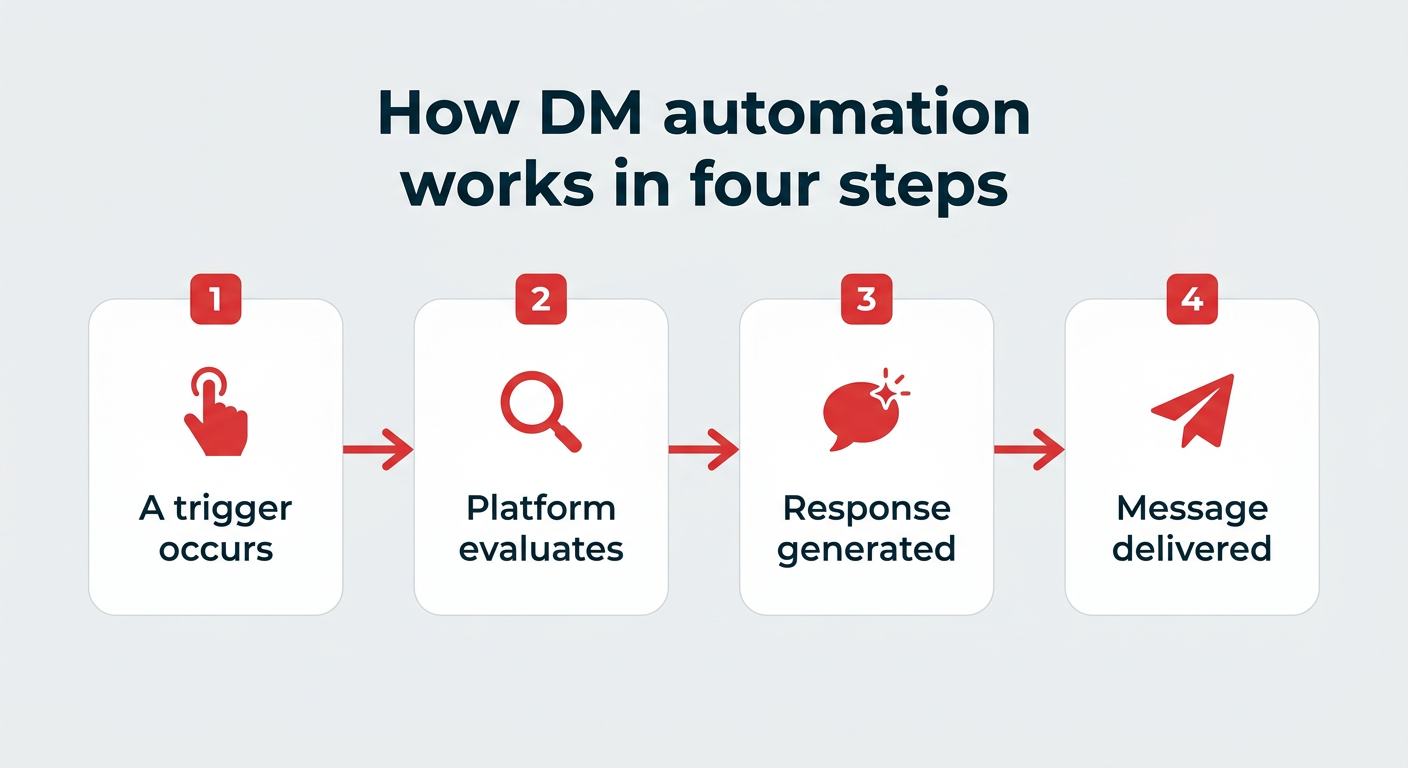
Here is what happens step by step:
- A trigger occurs: A user takes an action, like sending a first-time DM, typing a specific phrase, or commenting a keyword on your post.
- The platform evaluates the trigger: The automation tool checks the action against your rules (for keyword and Boolean setups) or runs it through an AI model (for chatbots).
- A response is generated or selected: Rule-based tools pull a pre-written reply, while an AI chatbot writes a custom response based on the context of the conversation.
- The message is delivered: The reply lands in the user’s inbox instantly, and the conversation continues or hands off to a human as needed.
The key difference is flexibility. Rule-based triggers only fire when an exact condition is met, while AI chatbots interpret natural language and adapt on the fly.
Why does DM automation matter for your business?
DM automation is not about replacing your team. It is about freeing them to focus on the work that actually needs a human. Here are four reasons it earns its place in your customer care strategy.
How does DM automation save time and resources?
Is using DM automation faster than having human beings respond to all your messages? Yes.
But it doesn’t have to be one or the other. Let DM automation handle the easy stuff, like someone asking for your street address or payment options. Save the tough, more nuanced messages for your human customer service team, like a customer who’s unhappy about product quality.
1-800-Flowers balances automation with quick customer service by providing a clickable option to connect with a human representative.
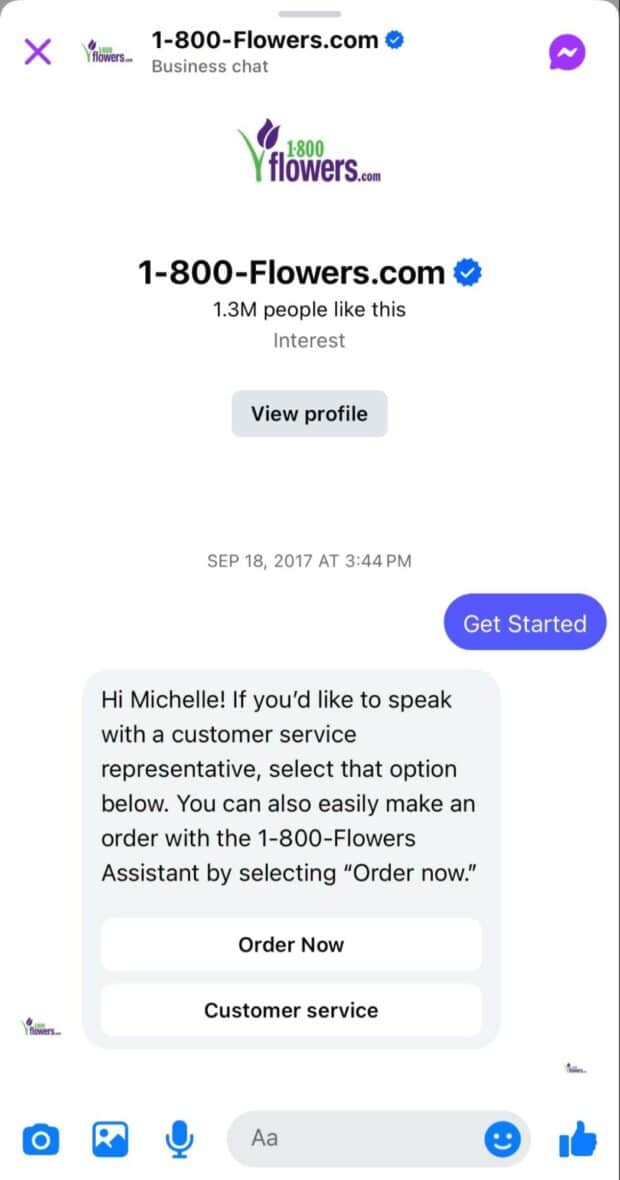
Source: 1-800-Flowers on Facebook
Automated DMs aren’t meant to completely replace human customer service. Instead, they enhance it by automating the repetitive stuff — Gartner predicts AI will resolve 80% of routine issues by 2029 — so your team can focus on where they’ll have the biggest impact.
Nest, the customer care app inside Hootsuite Social OS, reduces your customer service team’s messages by up to 80%, all in one place where you can see and answer DMs and comments across multiple platforms together.
How does DM automation enable personalized customer service at scale?
Conversational AI chatbots are able to understand the context of DMs using natural language processing. That means your customers can type normal messages they’d send to a human and get back the answers they need, without having to wait for a live customer service rep.
A DM automation chatbot lets you provide personalized service at scale.
For example, let chatbots handle questions about shipment tracking or order issues. Someone may start a chat with, “I haven’t received my order.” The AI chatbot can then ask follow up questions, like the order number or customer’s address, to look up the order info and relay the tracking information.
The key is that the chatbot remembers the entire conversation, so it’s a much more natural experience for the customer, like chatting with a human.
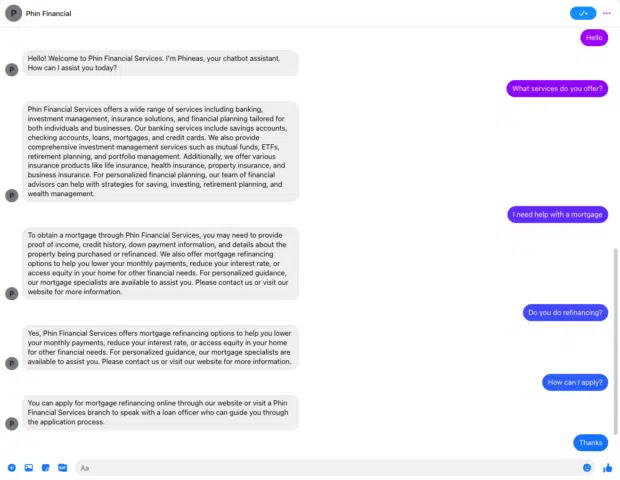
This way, your customers get the personalized information they need quickly which also frees up your customer service team to handle more complex inquiries faster.
However, some situations are too complex for a chatbot to solve, like deciding whether to offer a replacement to keep a customer’s loyalty.
There are always exceptions in customer service, a nuance that a machine just can’t figure out.
For this reason, it’s important to have an option for customers interacting with a social media chatbot to connect with a customer service rep. It could be a button in the chat window or a phrase, such as, “Call customer service.”
How does DM automation provide 24/7 response coverage?
Before social media, businesses had business hours and that was it. You either left a message or email, or waited until the next day to reach someone. Now with social media, customers expect answers sooner and the lines between “open” and “closed” continue to blur.
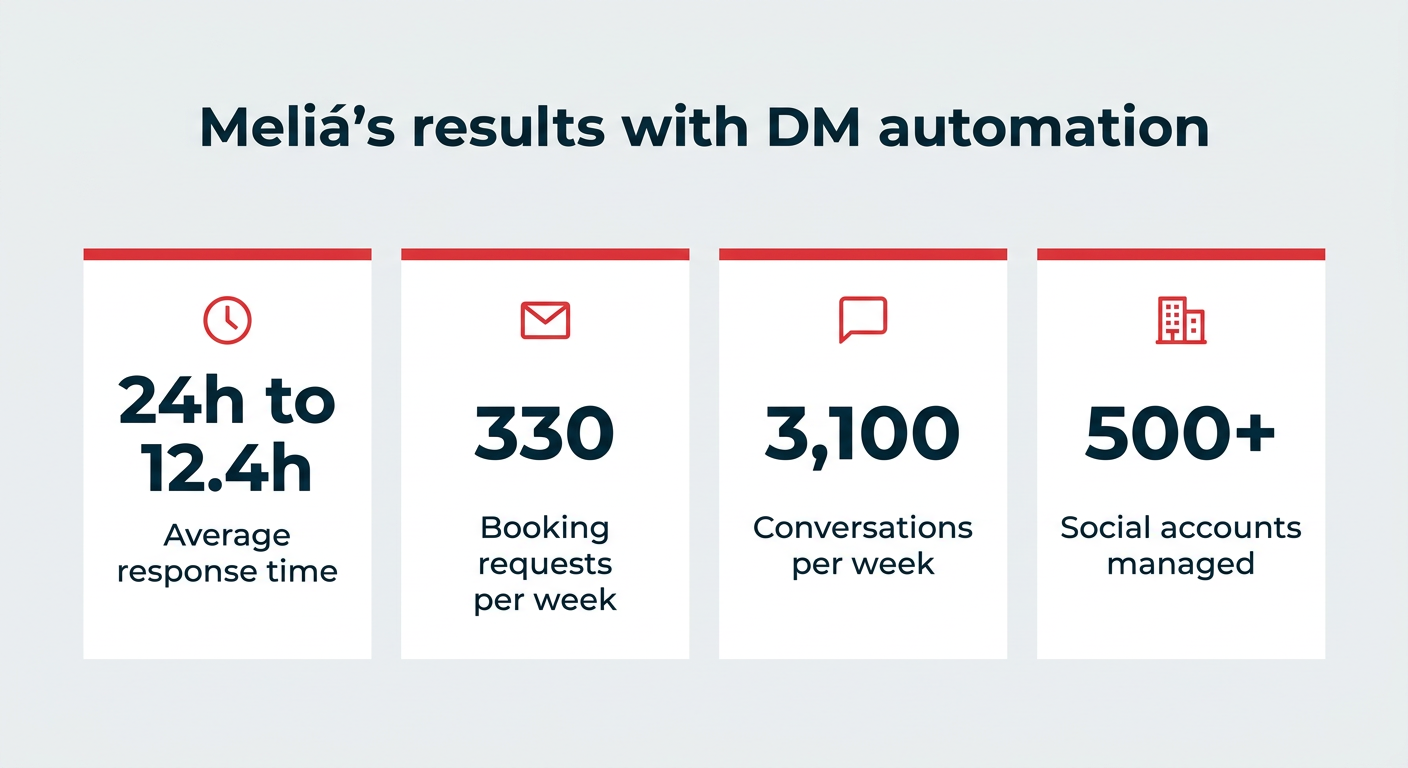
Meliá Hotels, the third largest hotel group in Europe, manages over 500 social media accounts across their global network and handles an average 3,100 conversations per week.
When we started to realize how many people wanted to book hotel rooms through social media, we realized we hadn’t capitalized on the business potential coming through direct and public messaging.
Meliá started using Nest with a dedicated social customer care team. Their representatives work a traditional Monday-Friday schedule and they have an auto-responder set up to handle off hours requests. It states when the customer can expect to hear back from them, and offers alternative contact information for more urgent requests.
After implementing DM automation across Facebook, Instagram, and X within Nest, Meliá reduced their average (human) response time from 24 hours to 12.4 hours and receives 330 booking requests per week via social media.
How does DM automation turn FAQs into an interactive experience?
Automating frequently asked questions is the biggest time saver for your human customer service reps. Customers get answers right away instead of waiting in a queue for hours or days and your team doesn’t have to type the same answers over and over.
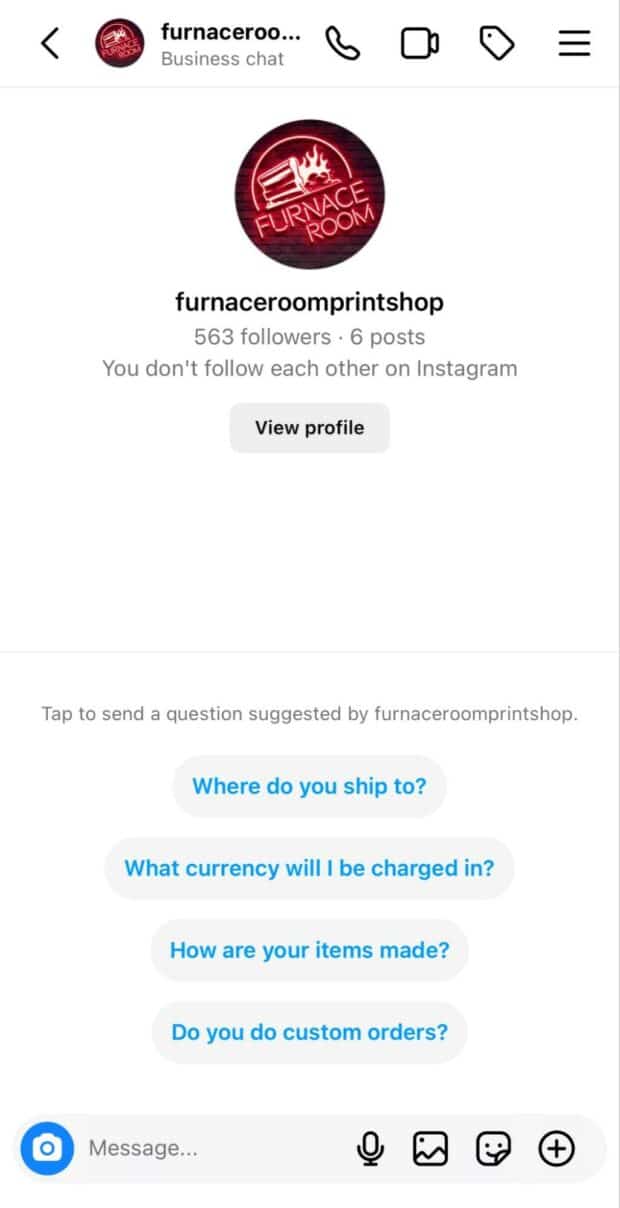
Automated FAQs usually take one of two forms:
- Using a conversational chatbot to understand the context and meaning behind customer inquiries and replying with the relevant company policy or answer.
- A tap to ask “question tree” layout where customers tap on pre-set questions to receive an automatic saved reply.
Conversational bots are a bit more complex to set up and require your customer to type their own question, whereas a “tap to answer” FAQ chatbot is easy to set up and offers the least amount of friction for customers to start interacting with.
Source: Instagram
What is a DM automation CTA?
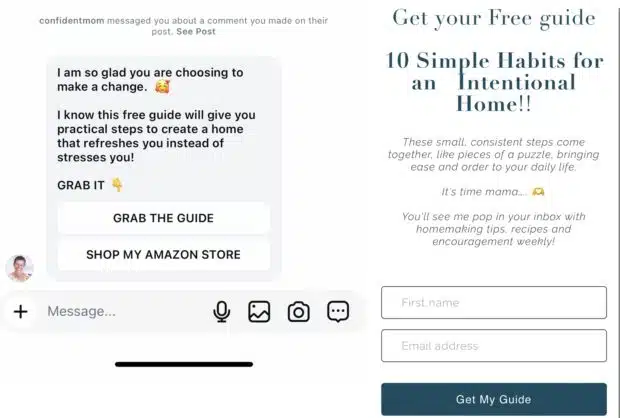
A DM automation CTA is a call-to-action on a social media post that prompts users to comment a specific keyword, which automatically triggers a direct message containing a link, offer, or resource. It has become one of the fastest-growing DM automation tactics in 2026, particularly on Reels, which accounted for 46% of US time spent on Instagram in 2025, because it turns passive scrollers into engaged leads without any manual follow-up.
Here is how it usually looks in the wild:
- “Comment GUIDE to get the free PDF”: Delivers a lead magnet straight to the commenter’s inbox.
- “Comment PRICE for the link”: Sends a product or pricing page to interested buyers instantly.
- “Comment YES for the discount code”: Drops a promo code and can also capture the user’s email for your list.
That last example shows how a DM automation CTA doubles as a list-building tool. Some chatbots can remember and pass on information they obtain during a conversation, like an email address, so you can send the code and add that person to your email list at the same time.
Source: @ConfidentMom on Instagram
This works natively on Instagram and Facebook, and through third-party tools on other platforms. See the Instagram section below for setup details.
How to automate DMs on Instagram
Instagram DM automation comes in three main flavors: saved replies, frequently asked questions, and comment-to-DM keyword triggers (the CTA automation from above).
Saved replies are pre-set answers or phrases you save to your account. However, to use them, you still need to respond manually to people. It just saves on typing time.
Frequently asked questions are like the FAQ example above: a list of commonly asked questions customers can tap and then receive an instant, automated answer.
Comment-to-DM triggers let you set a keyword so anyone who comments it on a Reel or post gets an automatic DM. This is how most creators run their DM automation CTAs.
Since this article is about DM automation, we’ll focus on the FAQ automation in Instagram. You will need either a Business or Creator account to use this feature.
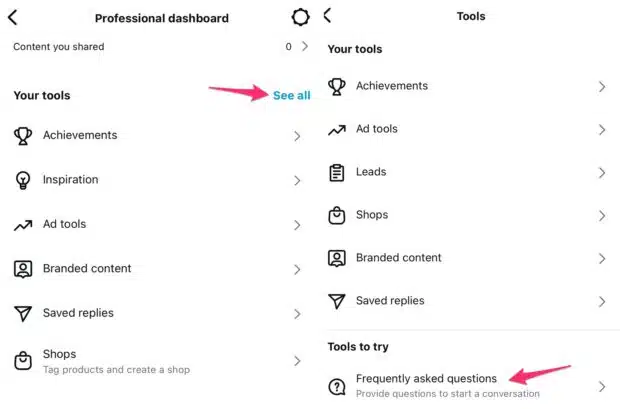
To set it up, go to your Instagram account in the app then tap on Professional dashboard.
Tap on See all under the Tools section, then Frequently asked questions.
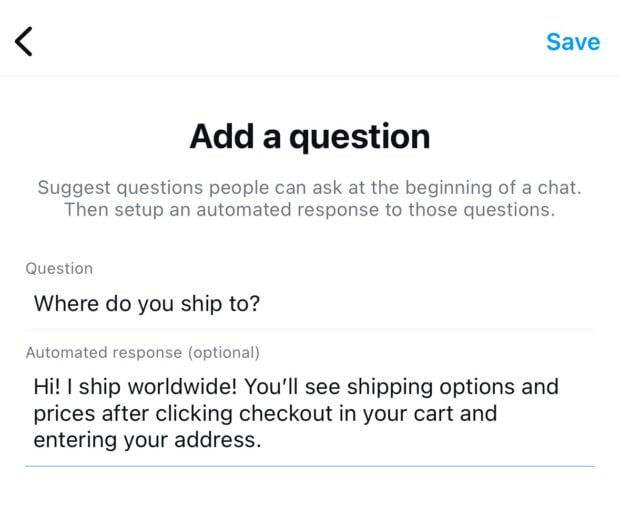
Set up your first automated FAQ by typing the question as you want customers to see it, then the answer. When done, tap Save at the top.
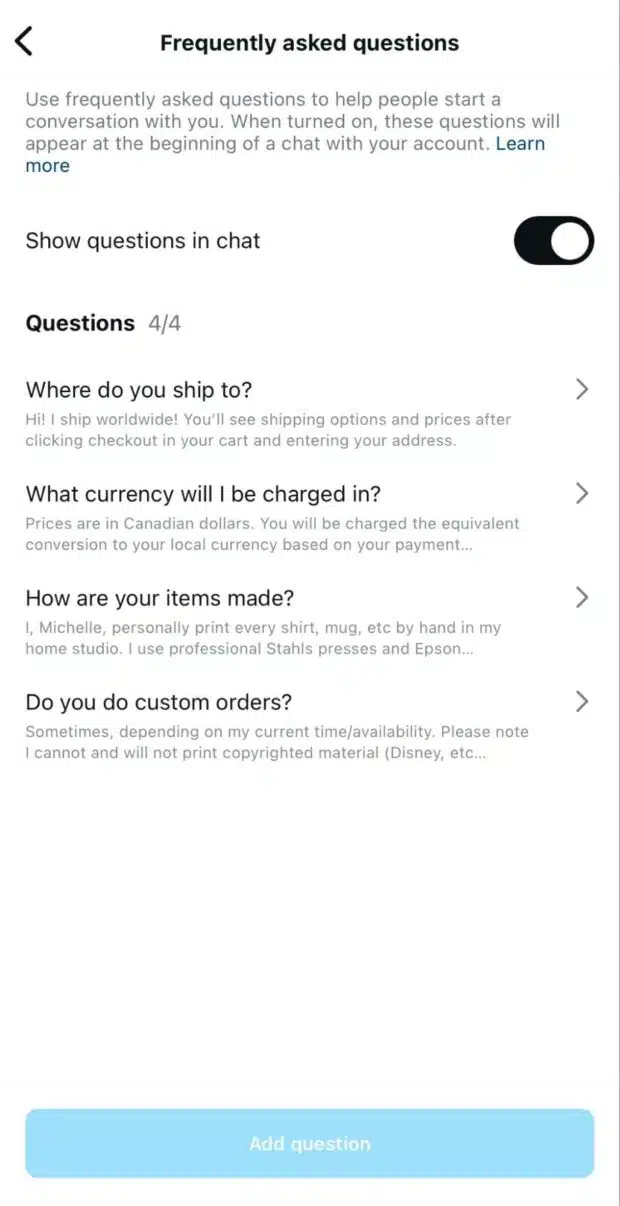
You can add up to four automated FAQs and, optionally, for these questions to appear as options to tap when a customer initiates a message to you. We recommend leaving this setting turned on.
For anything beyond these native limits, like multi-step conversations or CTA automations across many posts, an Instagram automation tool gives you far more room to work.
How to automate DMs on Facebook
Facebook DM automation offers a few native tools, including:
- Automated DM welcome message
- Automated frequently asked questions
- Automated away message
- Custom keyword DM automations
I’ll focus on setting up a FAQ for this example, but you can set up any of these using the same process. This is the process on a desktop computer, but you can also set up Facebook DM automation on mobile.
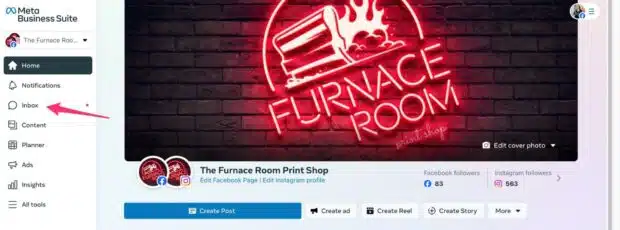
Go to Meta Business Suite, then click on Inbox.
Click on Automations at the top.
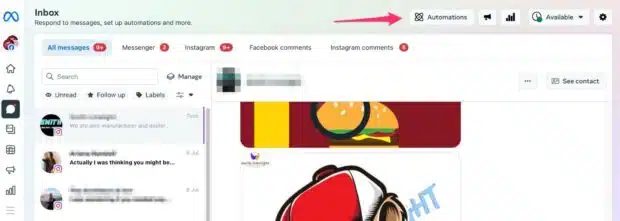
Either click Create Automation at the top, or Try It underneath one of the suggested automations to set up that specific one. I’ll use the top button for this example.
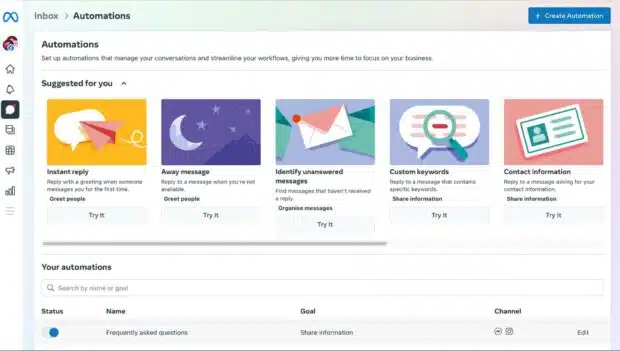
Choose the type of DM automation you want to create.
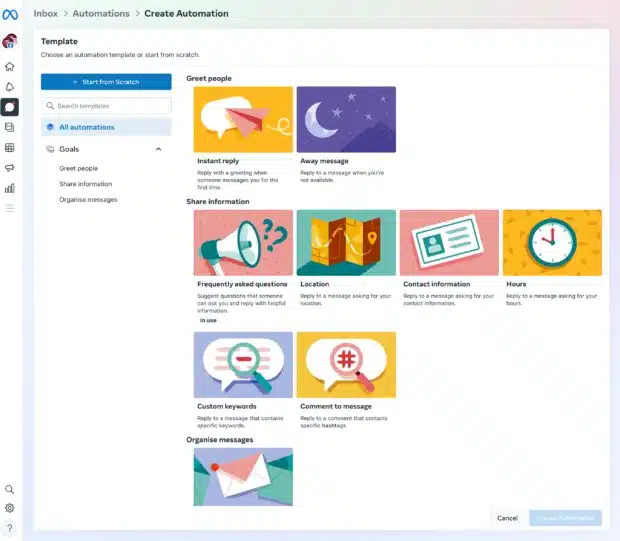
I chose frequently asked questions. Click Add Another Question to add your questions and answers. You can add an image or video to the answer, perfect for demonstrating how to do something, or a button linking to any URL.
You can also choose to have certain questions always available for customers to tap in chat, though it only shows the first 30 characters.
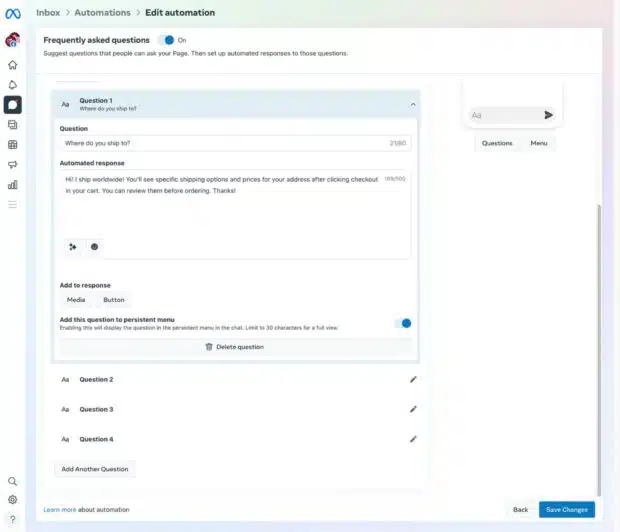
Click Save Changes at the bottom and your new FAQ DM automations are ready to use in Facebook Messenger. Because Meta Business Suite also connects to WhatsApp, you can extend similar automated replies to WhatsApp Business conversations from the same place.
How to automate DMs on X, LinkedIn, and TikTok
Beyond Instagram and Facebook, native automation gets thin fast. Here is where each platform stands in 2026 and how to work around the gaps.
X (formerly Twitter)
Currently, X doesn’t offer native DM automation. The best way to automate DMs on X is to use a third-party tool like Nest, the customer care app in Hootsuite Social OS. Its chatbot automates up to 80% of incoming messages across all your social platforms, including X. That means you can set up welcome messages, keyword replies, and human handoff on X even though the platform itself gives you no built-in tools.
LinkedIn is deliberately restrictive when it comes to automation, so tread carefully here. For company pages, LinkedIn offers native “Away” messages and quick replies that help you respond to inbound messages without a full bot. Third-party automation tools exist, but many aggressive outreach tools violate LinkedIn’s terms of service and can get accounts restricted. If you automate on LinkedIn, stick to tools that respect the platform’s rules and focus on responding to inbound messages rather than mass outreach. This matters most for B2B teams managing high-value conversations.
TikTok
TikTok’s DM automation options are still emerging. The platform limits native automated messaging, so most brands rely on third-party tools to trigger keyword-based replies. One practical use case is TikTok Shop, which supports automated messaging for order inquiries like shipping updates and delivery questions. If DMs are central to your TikTok strategy, plan to connect a dedicated TikTok management tool rather than expecting robust native features.
Best DM automation tools compared
When you’re evaluating DM automation tools, look at which platforms they support, how advanced their AI is, how they price, how quickly you can get set up, and whether they offer enterprise-grade governance. Here is how the leading options stack up.
| Tool | Platforms supported | AI capabilities | Pricing model | Ease of setup | Enterprise features |
|---|---|---|---|---|---|
| Hootsuite Social OS (Nest) | Instagram, Facebook, X, TikTok, LinkedIn, and more | AI chatbot with conversational context and routing | From $99/user/month (Standard) | Moderate, full onboarding support | SSO, governance, analytics, CRM integrations |
| ManyChat | Instagram, Facebook, WhatsApp, TikTok | Keyword flows plus AI add-ons | Free tier, paid from monthly fee | Easy | Limited |
| Chatfuel | Instagram, Facebook, WhatsApp | AI and rule-based flows | Paid monthly | Easy | Limited |
| Customers.ai | Instagram, Facebook, web | AI plus lead capture | Paid monthly | Moderate | Some |
| Native platform tools | One platform each | Basic keyword and FAQ only | Free | Very easy | None |
Native tools are great for getting started for free, but they cap out quickly. If you manage multiple platforms or need governance and reporting, a unified tool saves far more time than it costs.
How to automate DMs across all platforms with Hootsuite
There’s a much easier way to handle all your public and private messages and comments: use Nest in Hootsuite Social OS to assign, reply to, and automate messages across all your social profiles and team members in one place.
You get all the benefits of DM automation across every major social network, plus best-in-class content scheduling, detailed analytics, team collaboration, and social listening. Wisdom, the AI orchestration layer in Hootsuite Social OS, routes each message intelligently, while Vigil keeps your workflows governed and compliant.
Want to see how Nest can improve your social media customer service, engagement, and audience satisfaction?
Nest makes engagement easy by enabling you to:
- Assign and track messages: Route incoming messages to your staff and track which have been answered, ensuring no messages get missed.
- Blend AI with human care: Use the AI conversational chatbot to automate DMs while letting customers reach human reps for more complex issues.
- See full context: View the full history of interactions with each person across platforms so your team can personalize replies.
- Integrate your CRM: Connect customer profiles with Salesforce and Microsoft Dynamics to add notes and view social media customer service ROI.
- Measure performance: Track response times and CSAT metrics to improve service over time.
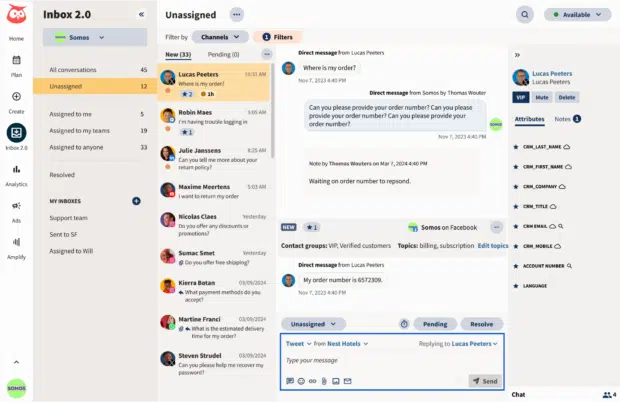
With Nest’s auto-responses, saved replies, AI-powered chatbot, intelligent message routing, and virtual agents, your customers will feel the love, and you’ll receive more of it with automatic satisfaction surveys sent after interactions.
Best practices for DM automation
DM automation is safe and effective when you set it up thoughtfully. Follow these practices to protect your brand and stay on the right side of platform rules.
- Always offer human escalation: Give customers a clear path to a real person for complex or sensitive issues. Some inquiries need judgment a bot cannot provide.
- Stay within platform terms of service: Each network has its own rules, especially LinkedIn. Using tools that comply keeps your accounts safe from restrictions.
- Maintain your brand voice: Write automated replies that sound like you, not a robot. Consistency builds trust.
- Don’t over-automate: Automate the repetitive, predictable messages and leave the nuanced conversations to your team.
- Test and iterate: Review your automations regularly as part of your broader social media strategy, check what’s working, and refine your triggers and replies.
- Comply with data privacy regulations: If you collect emails or personal data through DMs, follow GDPR and similar rules. For enterprise teams, Vigil in Hootsuite Social OS adds a governance layer that helps keep automated workflows compliant.
Done right, DM automation strengthens customer trust rather than eroding it.
FAQ: DM automation
What is DM automation?
Is DM automation free?
How do I set up DM automation on Instagram?
What is a DM automation CTA?
Is DM automation safe to use?
Can DM automation increase sales?
What platforms support DM automation?
What is the difference between a chatbot and DM automation?
Can I automate DMs across multiple platforms at once?
Should I always give customers the option to reach a human?
Save time managing your social media marketing strategy with Hootsuite. Publish and schedule posts, find relevant conversions, measure results, and more â all from one dashboard. Try it free today.
The post DM automation in 2026: How to set it up right appeared first on Social Media Marketing & Management Dashboard.