Key takeaways
- Engagement rate measures how many people interact with your social content relative to reach, impressions, or follower count. It includes actions like likes, comments, shares, and saves, but not passive views.
- The most common formula is engagement rate by reach (ERR): total engagements divided by reach, multiplied by 100. Different formulas suit different goals, from organic posts to paid campaigns.
- A good engagement rate typically falls between 1% and 5%, but benchmarks vary significantly by platform and industry. Always compare against your specific platform and industry, not a universal standard.
- Automating engagement rate tracking with analytics tools like Hootsuite eliminates manual calculations. Social media analytics tools can also provide industry benchmarks for comparison.
What is engagement rate?
Engagement rate is a social media metric that measures how much of your audience actively engages with your content. It defines the amount of interaction a piece of content (or a campaign, or a whole account) gets compared to reach or audience size.
Engagement metrics vary by channel, but in general, it’s any action someone takes to interact with your content, including likes, comments, shares, saves, poll responses, messages, or link clicks. Because each platform counts engagement a little differently, it helps to know exactly what actions feed into your social media engagement rate before you calculate it.
Why does engagement rate matter?
Engagement rate matters because it shows whether your content is actually connecting with your audience. When people take the time to like, comment, share, or save a post, it’s a strong signal that they find it interesting or useful.
Second, higher engagement rates help you get better visibility on social media platforms. That’s because social algorithms surface more engaging content to new audiences.
A lot of engagement on your content also makes you look more trustworthy and appealing to first-time profile visitors, especially if there’s an active conversation happening in your comments. For enterprise teams, engagement rate is also one of the clearest ways to prove social ROI to leadership, since it ties content performance to real audience behavior.
What counts as engagement on each platform?
Engagement is any action a user takes to interact with your content, but the specific actions that count vary from platform to platform. Knowing what feeds into the formula helps you calculate an accurate engagement rate and compare performance fairly across channels.
Here’s what typically counts as engagement on each major social network:
- Instagram: Likes, comments, shares, saves, and replies to Stories.
- TikTok: Likes, comments, shares, saves, and follows generated by a video.
- Facebook: Reactions, comments, shares, and clicks on links or buttons.
- LinkedIn: Reactions, comments, shares (reposts), and clicks.
- X (Twitter): Likes, replies, reposts, quote posts, and clicks.
- Pinterest: Saves (repins), comments, clicks, and close-ups.
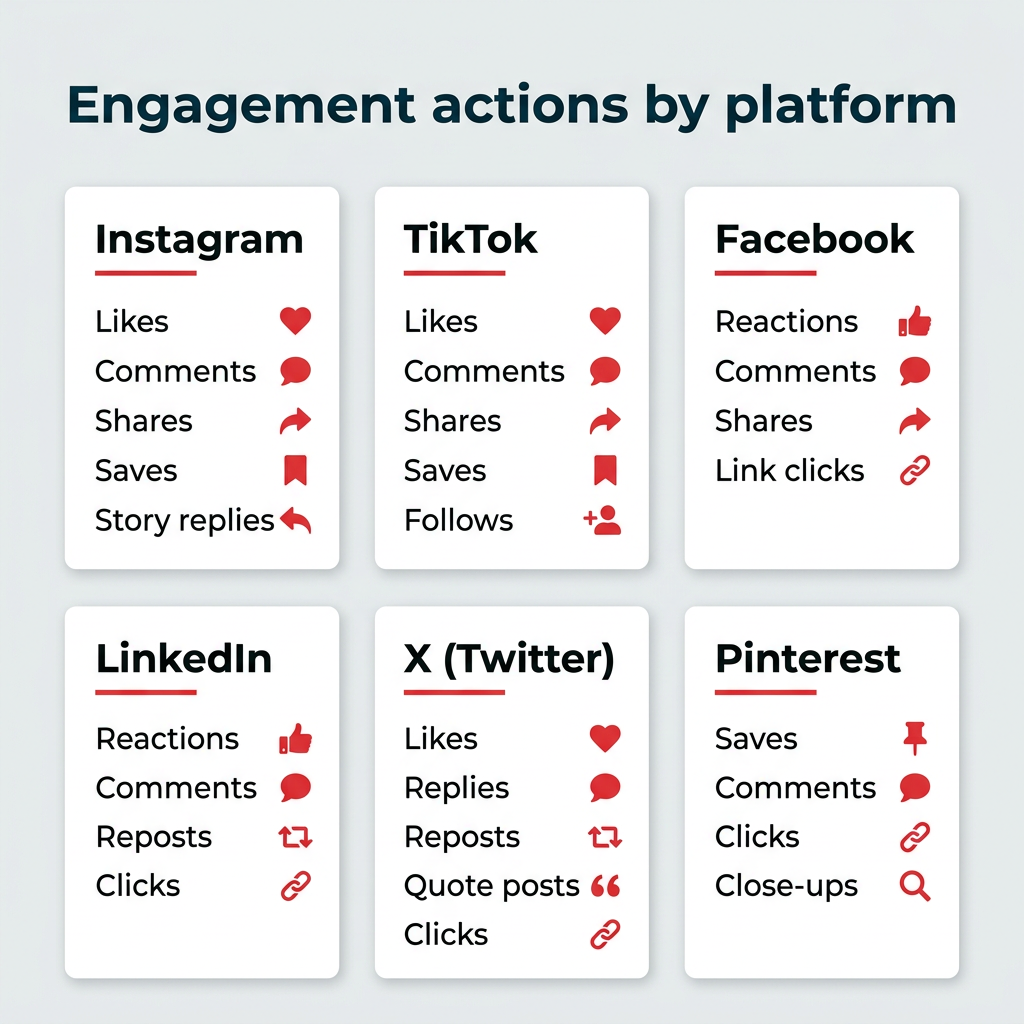
Passive metrics like impressions and views usually don’t count as engagement on their own, since they measure exposure rather than interaction. When in doubt, check the platform’s analytics to confirm which actions it includes before running your numbers.
How can you calculate engagement rate for free?
You can calculate engagement rate for free using our calculator tool or by using a social media analytics platform like Hootsuite.
Tip: You can use this free tool to calculate your account’s overall engagement rate, the engagement rate of a specific campaign, or the engagement rate for a specific time period.
For overall engagement, include information about all your posts (e.g., total number of posts published, total number of likes and comments, and so on).
For a specific campaign, only include the details of the posts that were part of the campaign. Same goes for a specific timeframe.
If you’re looking for a more detailed engagement analysis or you want to calculate different kinds of engagement, download our free spreadsheet calculator. It will still do the math for you, but it’s got space for a little more complexity.
With Hootsuite Analytics, you can also:
- Find out when your audience is online and get personalized recommendations for your best times to post for each of your accounts based on when your audience is most likely to engage.
- View industry engagement rate benchmarks and see how you compare to competitors (so you have a better understanding of what a good engagement rate looks like for your industry).
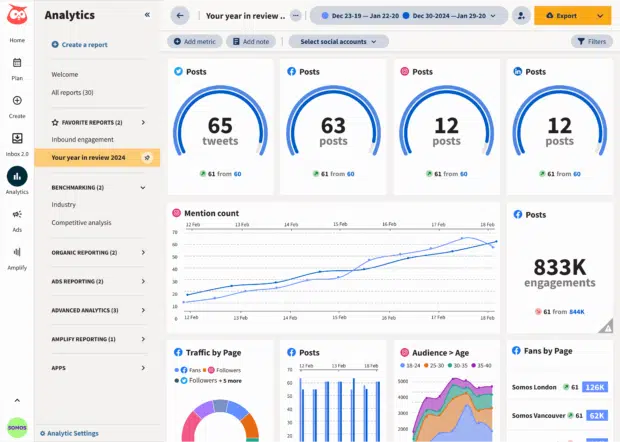
Hootsuite Analytics provides automated engagement rate tracking across all your social media accounts in one dashboard.
How do you calculate engagement rate?
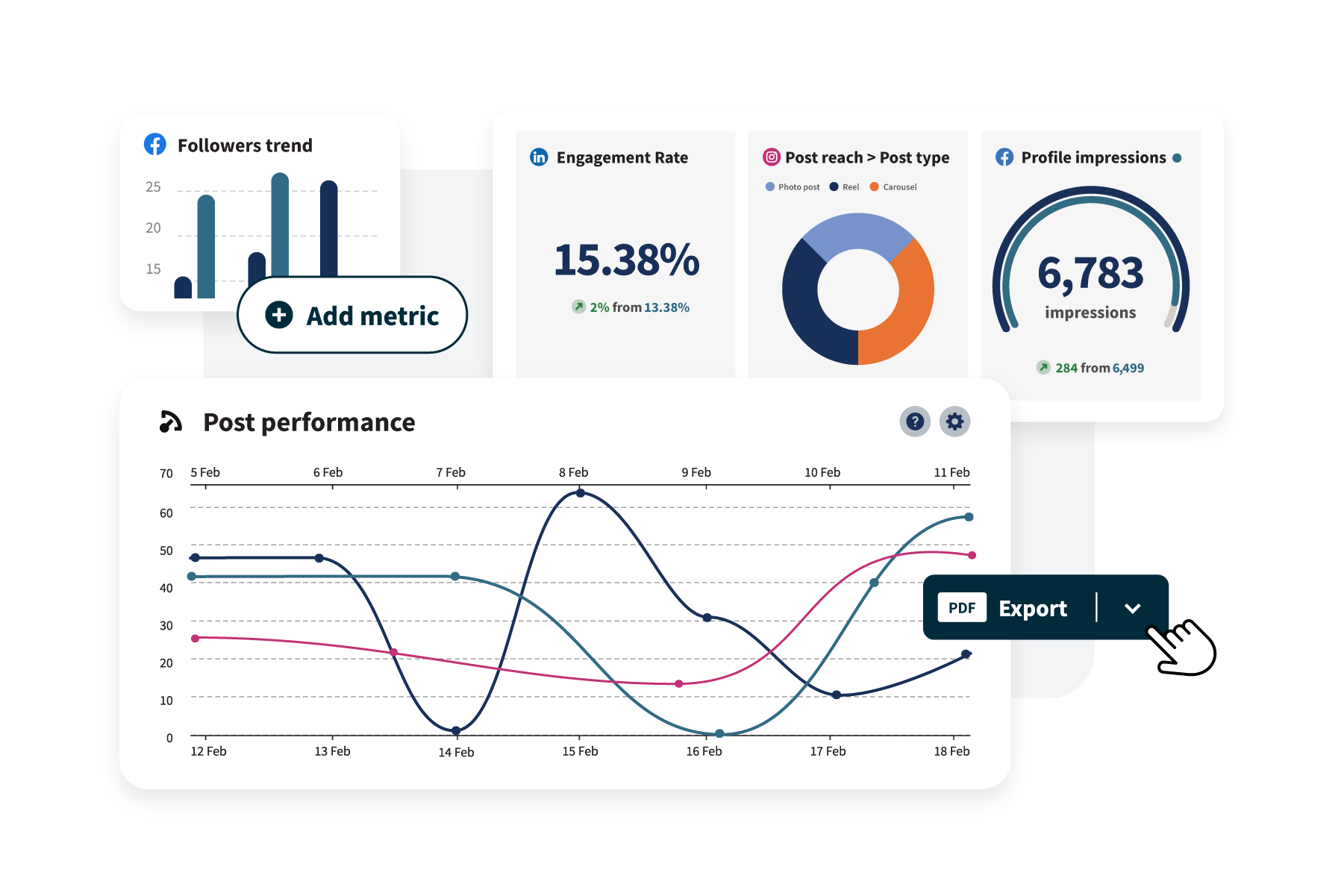
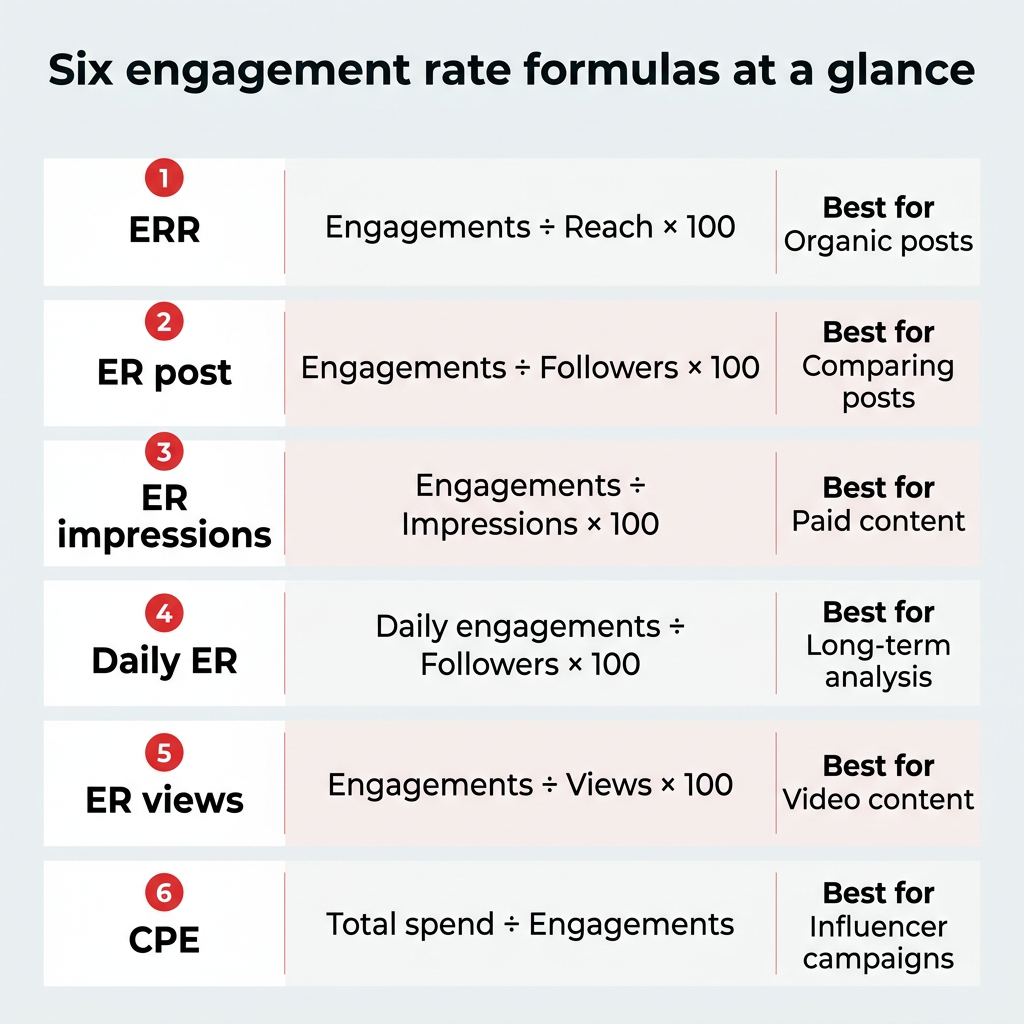
You calculate engagement rate by dividing total engagements by reach (or followers, impressions, or views), then multiplying by 100. Here are the six most common formulas for calculating engagement rates on social media:
- Engagement rate by reach (ERR): Most common.
- Engagement rate by post (ER post): Best for specific posts.
- Engagement rate by impressions (ER impressions): Best for paid content.
- Daily engagement rate (Daily ER): Best for long-term analysis.
- Engagement rate by views (ER views): Best for video.
- Cost per engagement (CPE): Best for influencer marketing or conversion-based campaigns.
1. Engagement rate by reach (ERR): most common
This is the most common engagement rate formula. ERR measures the percentage of people who interact with your content after seeing it.
Here’s how to calculate engagement rate for a single post:
ERR = total number of engagements on a post / reach of that post * 100
To calculate the average ERR across multiple posts, add together the ERR for each post and divide by the total number of posts:
Average ERR = Total ERR / Number of posts
For example: Post 1 (3.4%) + Post 2 (3.5%) / 2 = 3.45%
Pros: Because not all followers see every post, ERR is often more accurate than follower-based metrics, especially in algorithm-driven feeds. Reach includes both followers and non-followers who discover content through search, shares, hashtags, and recommendations.
Cons: Reach can fluctuate for a variety of reasons, making it a difficult variable to control. A very low reach can lead to a disproportionately high engagement, and vice versa, so be sure to keep this in mind.
2. Engagement rate by post (ER post): best for specific posts
Engagement rate by post (ER post) measures how many people engage with a post compared to your total follower count, making it a reliable way to compare performance across individual posts. (Most social media influencers calculate their average engagement this way.)
Here’s how to calculate engagement rate by post:
ER post = Total engagements on a post / Total followers *100
To calculate the average ER post across multiple posts, add up the engagement rate for each post and divide by the total number of posts:
Average ER by post = Total ER by post / Number of posts
Example: Post 1 (4.0%) + Post 2 (3.0%) / 2 = 3.5%
Pros: This formula offers a more accurate measure of post-by-post engagement if your reach tends to fluctuate.
Cons: This formula may not provide the full picture since it doesn’t account for viral reach. Make sure to view this stat alongside follower growth analytics, as you can expect this engagement rate calculation to go down as your follower count goes up.
3. Engagement rate by impressions (ER impressions): best for paid content
Engagement rate by impressions (ER impressions) measures how many engagements a post receives compared to the total number of times it’s displayed.
For context, impressions count every time your content appears on someone’s screen, even if the same person sees it multiple times. For example, if a user sees a post three times, that counts as one reach but three impressions.
Psst: We have a handy guide that lays out the difference between reach and impressions if you want to learn more.
Here’s how to calculate engagement rate by impressions:
ER impressions = Total engagements on a post / Total impressions *100
Average ER impressions = Total ER impressions / Number of posts
Pros: This formula is an effective way of measuring the success of paid content, especially when you are using a CPM cost structure (cost per thousand impressions).
Cons: An engagement rate calculation that uses the number of impressions as the base is bound to be lower than ERR and ER post equations. After all, a user who sees the same post (or ad) three times is not likely to engage with it three separate times. Plus, like reach, impressions can be inconsistent.
4. Daily engagement rate (Daily ER): best for long-term analysis
Daily engagement rate (Daily ER) measures how often your followers interact with your account on an average day. Here’s how to calculate it:
Daily ER = Total engagements in a day / Total followers *100
Average Daily ER = Total engagements for X days / (X *followers) *100
Example: Say you have a total of 100 engagements in 10 days with 400 followers.
Formula: 100 / (10 *400) *100 = 100 / 4000 *100 = 2.5%
Pros: Daily ER shows how frequently followers interact with your account overall, not just with newly published posts. As a result, it takes engagements on all posts into consideration, even if they were posted outside your reporting period. For example, if a new follower finds your account and likes some of your old posts, this will still be included in this equation.
You can also tailor this metric by counting specific actions, such as comments or saves, depending on your goals. For instance, if your brand only wants to measure daily comments, you can adjust “total engagements” accordingly.
Cons: The formula can’t distinguish between one follower engaging 10 times in a day versus 10 followers engaging once. Daily engagement volume can also fluctuate depending on how much content you publish, so it’s best to plot daily engagement with the number of posts published in the same period.
5. Engagement rate by views (ER views): best for video
Engagement rate by views (ER views) measures how many people engage with a video relative to the total number of views. Here’s how to calculate it:
ER views = Total engagements on video post / Total video views *100
Average ER views = Total ER views / Number of posts
Pros: If one of your video’s objectives is to generate engagement, this can be a good way to track it.
Cons: View counts often include repeat views from the same user. This can lower ER views compared to other engagement rate formulas.
6. Cost per engagement (CPE): best for influencer marketing or conversion-based campaigns
Cost per engagement (CPE) shows how much you pay for each engagement a campaign generates.
To calculate cost per engagement, divide the total amount spent by the total number of engagements:
CPE = Total amount spent / Total engagements
Most social media ad platforms will do this calculation for you, along with other objective-oriented calculations, such as cost-per-click. Make sure to check which interactions count as engagements before comparing results.
Which engagement rate formula should you use?
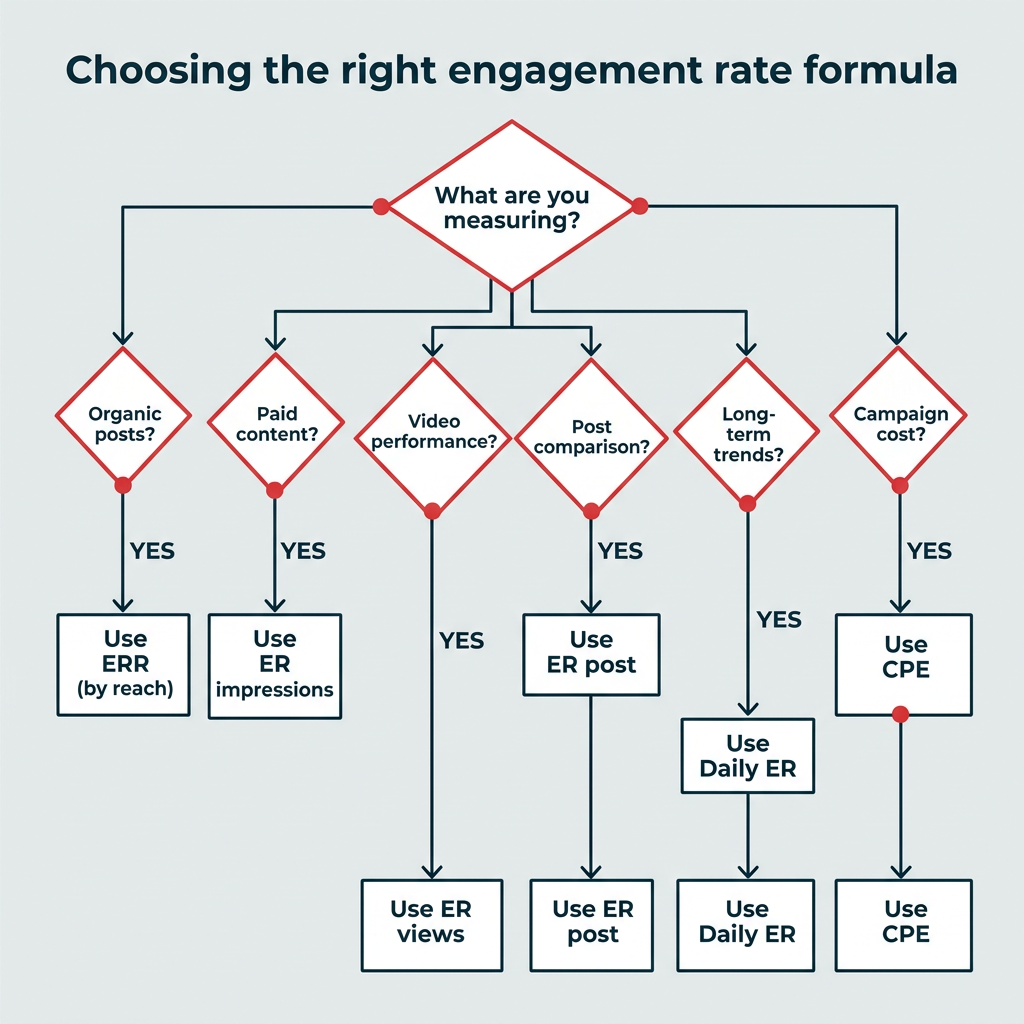
The right engagement rate formula depends on what you’re measuring and why. Each formula uses a different denominator, which changes what your result tells you. Here’s a side-by-side look to help you choose.
|
Formula |
Best for |
Denominator |
Key advantage |
Key limitation |
|---|---|---|---|---|
|
Engagement rate by reach (ERR) |
Organic posts |
Reach |
Reflects how content performs with people who actually saw it |
Reach fluctuates and is hard to control |
|
Engagement rate by post (ER post) |
Comparing individual posts |
Followers |
Stable baseline for post-by-post comparison |
Ignores viral reach beyond your followers |
|
Engagement rate by impressions |
Paid content |
Impressions |
Effective for CPM-based campaigns |
Produces lower rates; impressions can be inconsistent |
|
Daily engagement rate (Daily ER) |
Long-term account analysis |
Followers (per day) |
Captures engagement on all posts, old and new |
Can’t tell one active follower from many |
|
Engagement rate by views (ER views) |
Video content |
Video views |
Tracks engagement relative to video reach |
Repeat views can lower the rate |
|
Cost per engagement (CPE) |
Influencer or conversion campaigns |
Total spend |
Shows the cost efficiency of each interaction |
Requires consistent definitions of engagement |
For most teams, engagement rate by reach (ERR) is the best default for organic content, while engagement rate by impressions is the clearest choice for paid campaigns.
How to calculate engagement rate automatically
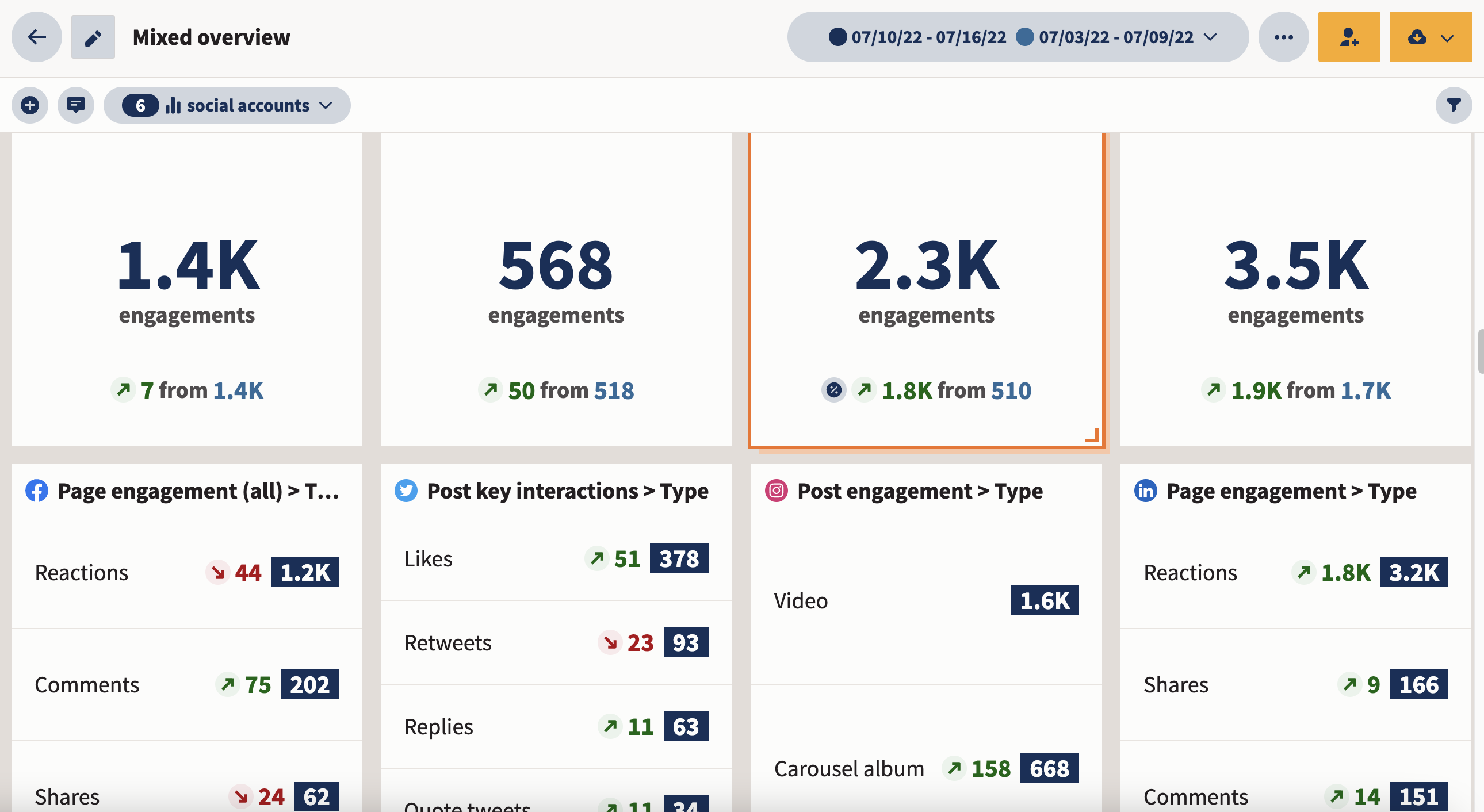
You can calculate engagement rate automatically by using a social media analytics tool like Hootsuite, which collects engagement data across platforms and applies standard formulas for you.
This means you can analyze your social media engagement rate across social networks from a high level and get as detailed as you want with customized reports. For enterprise teams managing many accounts, this multi-platform tracking removes hours of manual spreadsheet work.
Here’s an example of what an engagement rate report looks like in Hootsuite. In addition to your overall post engagement rate, you can also see what types of content get the highest engagement rate (so you can make more of those in the future), and even how many people visited your website.
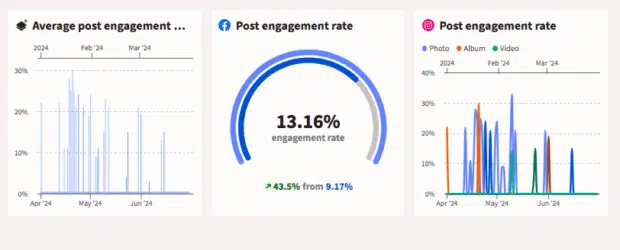
Hootsuite’s analytics dashboard displays your average post engagement rate and breaks down which content types drive the most interaction.
In Hootsuite reports, you can easily see how much engagement you get over a period of time, what is being counted as an engagement for each network, and compare your engagement rates to previous time periods.
Pro tip: You can schedule these reports to be created and sent to your email automatically. You can also set them to show you the data in whatever format makes the most sense to you: graphs, charts, etc.
A great bonus is that with Hootsuite, you get to see when your audience is most likely to engage with your posts, so you can schedule your content to maximize engagement rate.
What is a good engagement rate? Benchmarks for 2026
A good engagement rate generally falls between 1% and 5%. However, this number depends on a few factors:
- Platform: You should expect variation in your engagement rate across platforms, and this can change over time. For example, TikTok often sees a higher engagement rate than Instagram.
- Industry: When evaluating your engagement rate, you need to compare with other accounts in your own industry. Fashion and entertainment will always see higher engagement rates than finance (except on LinkedIn).
- Follower count: In general, you can expect your engagement rate to go down as your follower count goes up. This is because smaller accounts tend to have a more focused and passionate follower base.
The Hootsuite team partnered with data science agency Critical Truth to analyze over 1 million social posts across industries and social networks to identify reliable benchmarks you can use in your strategic planning. For more detail, see the full social media benchmarks report.
Use the master table below for a quick all-industry view by platform, then scroll to your specific industry for a more detailed breakdown.
|
Platform |
Average engagement rate (all industries) |
|---|---|
|
|
3% |
|
Instagram Reels |
2.7% |
|
|
2% |
|
X |
1.8% |
|
TikTok |
1.5% |
|
|
0.8% |
Overall engagement rate benchmarks (all industries)
Here are the average engagement rates across all industries by platform:
- Instagram: 3%
- Instagram Reels: 2.7%
- LinkedIn: 2%
- X: 1.8%
- TikTok: 1.5%
- Facebook: 0.8%
This bar chart shows average engagement rates by platform across all industries, with Instagram leading at 3% and Facebook at 0.8%.
Construction, mining, and manufacturing
Here are the engagement rate benchmarks for the construction, mining, and manufacturing industry:
- LinkedIn: 4.0%
- Instagram: 4.4%
- Instagram Reels: 3.4%
- TikTok: 2.6%
- X: 2.4%
- Facebook: 1.7%
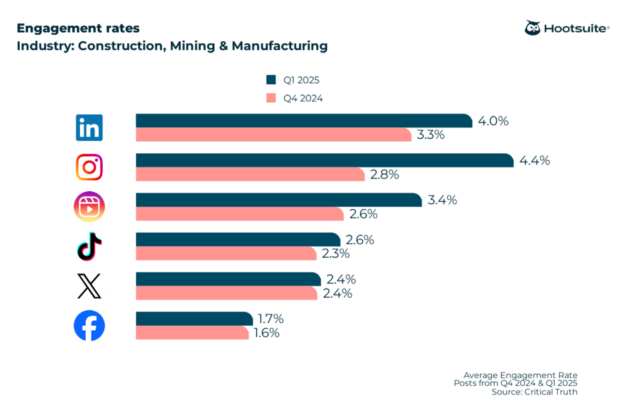
Engagement rate benchmarks for construction, mining, and manufacturing show Instagram leading at 4.4%.
Consumer goods and retail
Here are the engagement rate benchmarks for the consumer goods and retail industry:
- LinkedIn: 3.9%
- Instagram: 3%
- Instagram Reels: 2.4%
- TikTok: 1.6%
- X: 1.7%
- Facebook: 1.0%
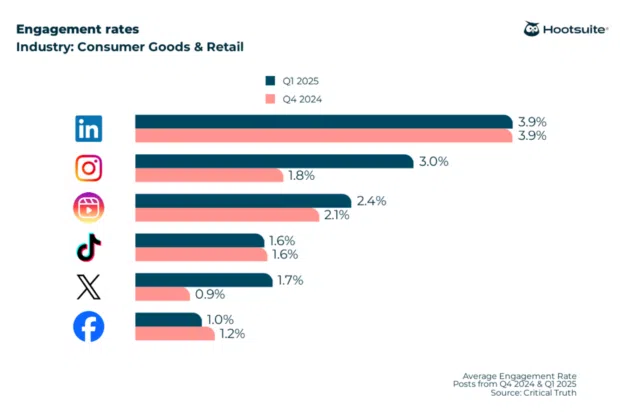
Engagement rate benchmarks for consumer goods and retail, with LinkedIn showing the highest rate at 3.9%.
Dining, hospitality, and tourism
Here are the engagement rate benchmarks for the dining, hospitality, and tourism industry:
- LinkedIn: 3.9%
- Instagram: 3.1%
- Instagram Reels: 2.6%
- X: 2.0%
- Facebook: 1.3%
- TikTok: 1.3%
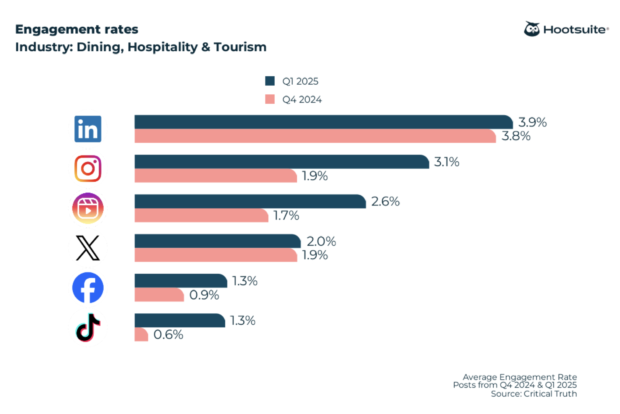
Engagement rate benchmarks for dining, hospitality, and tourism across major social platforms.
Finance
For a deeper breakdown, see the full financial services benchmarks.
- Instagram: 3.8%
- LinkedIn: 3.2%
- Instagram Reels: 3.1%
- TikTok: 1.6%
- X: 2.1%
- Facebook: 1.8%
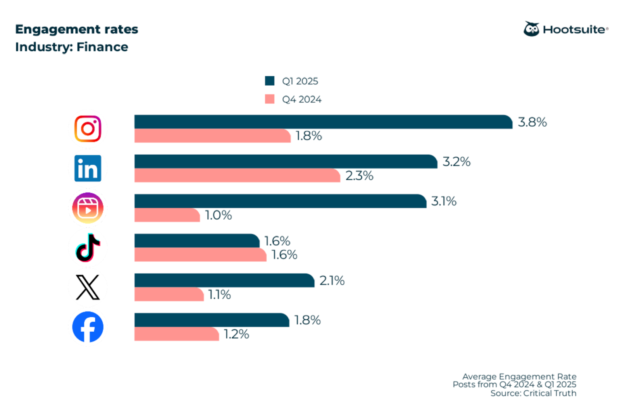
Engagement rate benchmarks for the financial services industry, with Instagram showing the strongest performance at 3.8%.
Government
For a deeper breakdown, see the full government social media benchmarks.
- Instagram: 3.5%
- LinkedIn: 2.7%
- Instagram Reels: 2.6%
- Facebook: 2.5%
- X: 1.7%
- TikTok: 1.6%
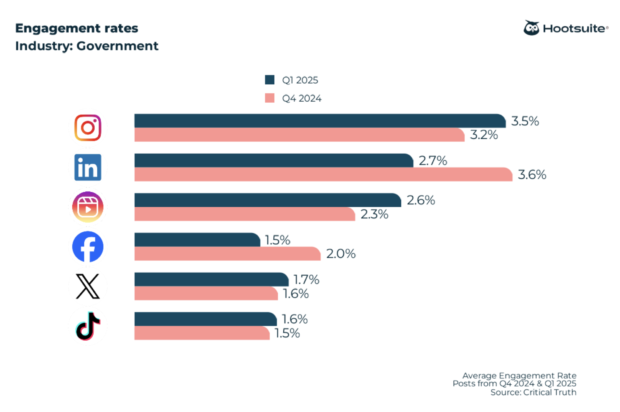
Engagement rate benchmarks for government organizations across social media platforms.
Healthcare, pharma, and biotech
For a deeper breakdown, see the full healthcare social media benchmarks.
- LinkedIn: 3.3%
- Instagram: 3.7%
- Instagram Reels: 2.7%
- X: 2.3%
- Facebook: 1.9%
- TikTok: 1%
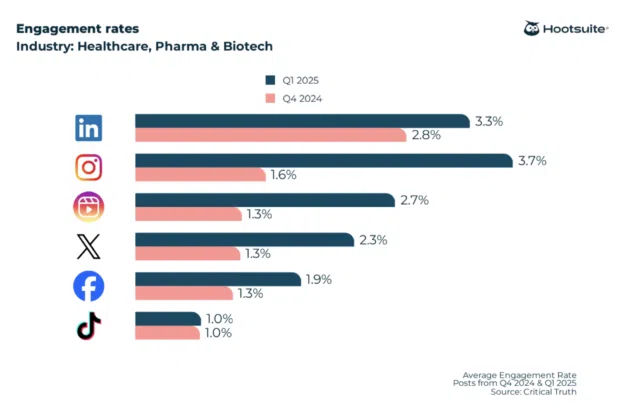
Engagement rate benchmarks for healthcare, pharma, and biotech organizations across major platforms.
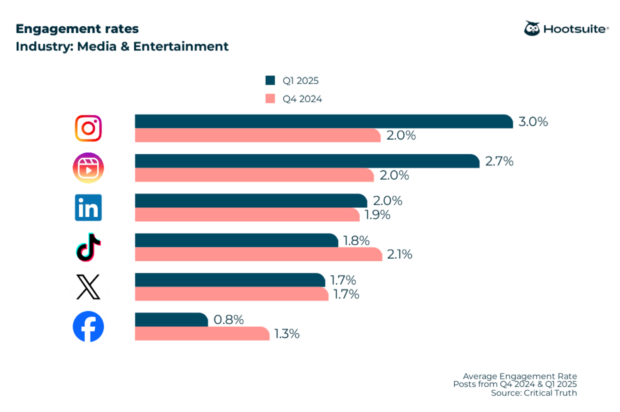
Media and entertainment
Industry-specific benchmarks for media and entertainment are available through Hootsuite’s built-in , which provides up-to-date engagement rate data by platform.
Nonprofit
Here are the engagement rate benchmarks for the nonprofit sector:
- Instagram Reels: 4%
- Instagram: 4.4%
- LinkedIn: 3%
- Facebook: 1.8%
- X: 2.1%
- TikTok: 1.3%
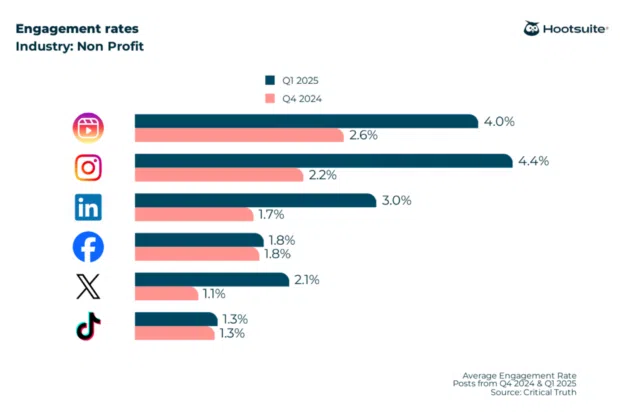
Engagement rate benchmarks for nonprofit organizations, with Instagram performing strongest at 4.4%.
Real estate, legal, and professional services
Industry-specific benchmarks for real estate, legal, and professional services are available through Hootsuite’s built-in benchmarking tool, which provides up-to-date engagement rate data by platform.
More industries
Hootsuite has a built in benchmarking tool that allows you to compare your engagement rate to the average for your industry. You can use it to see graphs of how engagement rate for your industry has changed over time, so you always have an up-to-date understanding of engagement trends.
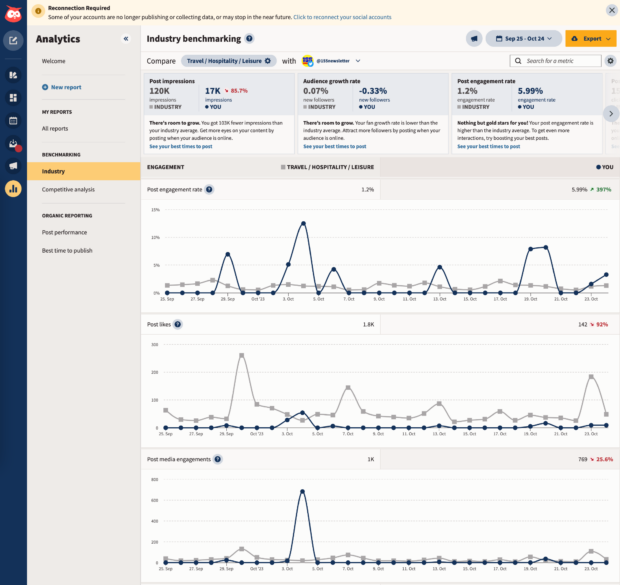
Hootsuite’s industry benchmarking tool lets you compare your performance to industry averages over time.
How to improve your engagement rate
The best way to improve your engagement rate is to study what’s already working, then do more of it. Once you understand which formats, topics, and timing drive interaction, you can refine your approach with intention rather than guesswork.
Here are practical tactics to increase your engagement rate:
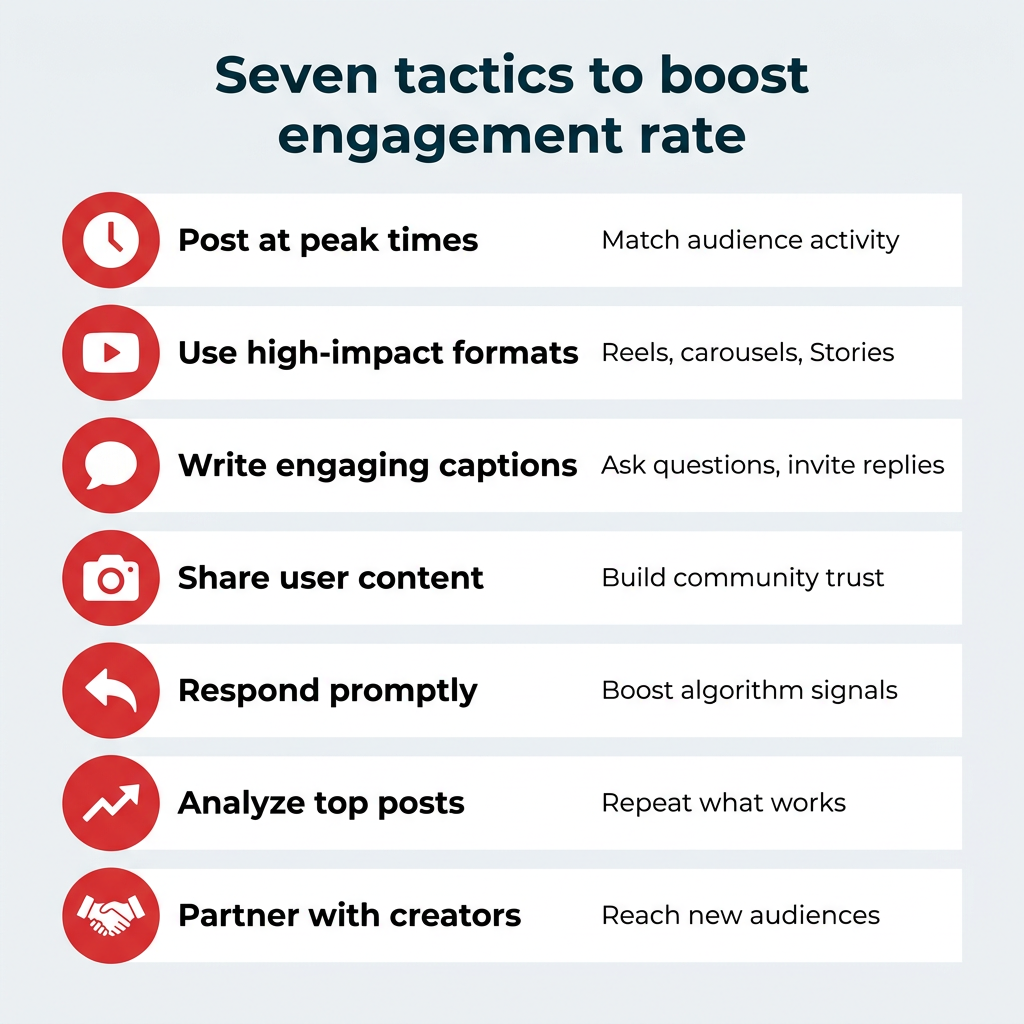
- Post at the right times. Use analytics to publish when your audience is most active. 37% of U.S. adults visit Facebook several times a day, so more people see and interact with your content. Hootsuite’s best time to post recommendations make this easy for each account.
- Experiment with high-performing formats. Short-form video like Reels and TikToks, carousels, and interactive Stories tend to drive strong engagement. Reels generated about 44% more interactions than images. Test a few formats and lean into the ones that resonate.
- Write captions that invite conversation. Ask questions, prompt opinions, or include a clear call to action so followers have a reason to reply.
- Lean on user-generated content. Resharing customer photos, reviews, and mentions builds trust and encourages your community to participate.
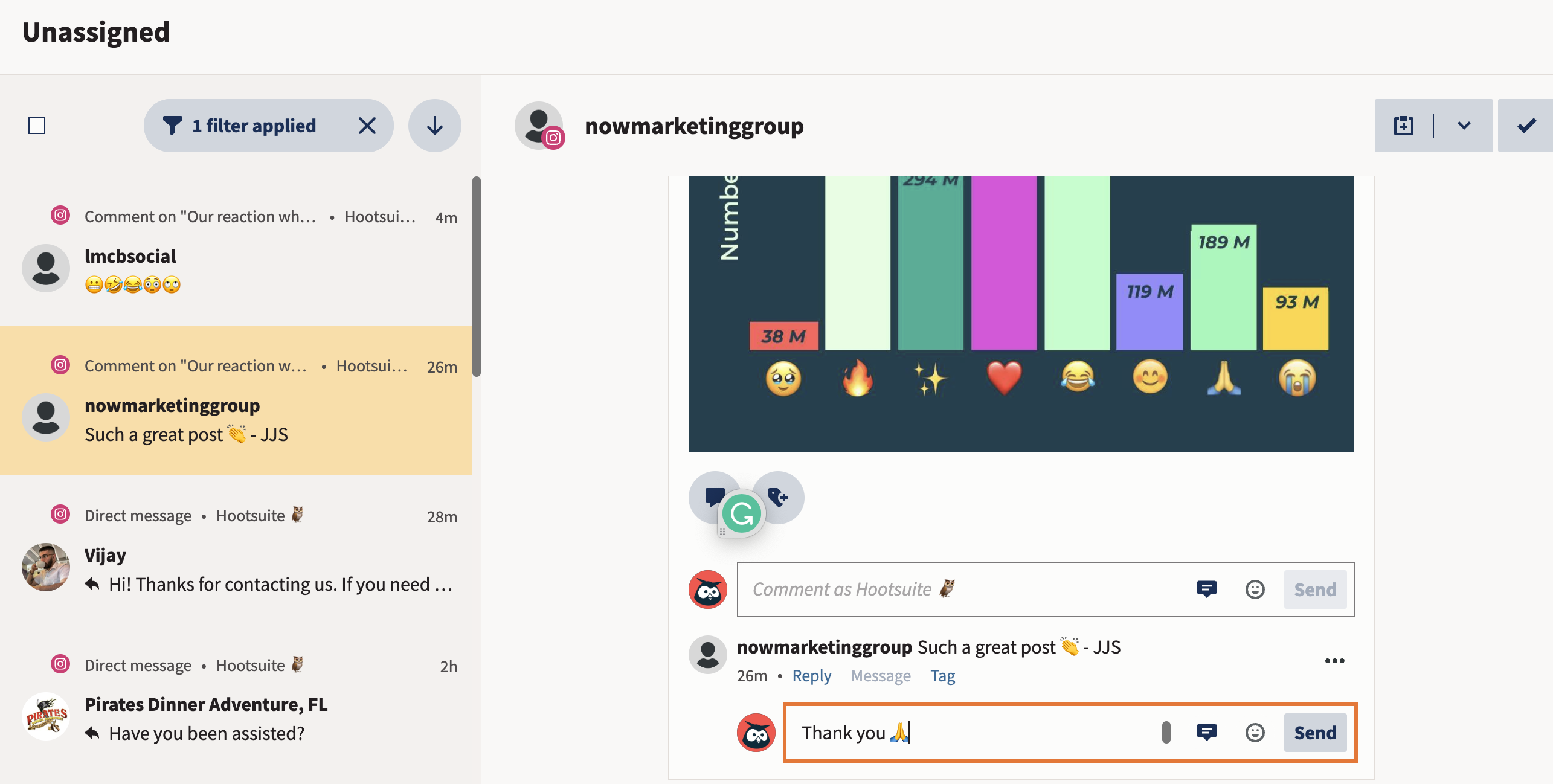
- Respond to comments and messages promptly. Active conversations signal to both your audience and the algorithm that your content is worth engaging with.
- Double down on what your data shows. Review your top posts regularly and reverse-engineer their success into your content strategy.
- Partner with the right creators. Your most engaged fans may be ideal brand advocates for collaborations that reach new, relevant audiences.
Small, consistent improvements across timing, format, and community engagement add up to a meaningfully higher engagement rate over time.
How to use engagement rate data in your social strategy
You use engagement rate data in your social strategy by tracking trends over time, then applying those insights to content planning, reporting, and decision-making.
Remember: Engagement rate is most valuable when you look beyond a single post and focus on patterns across platforms, formats, and time periods.
Here’s how engagement rate data can inform your strategy:
- Fill your content calendar with high-quality, engaging posts. Dive into your analytics to see which types of posts work best on each platform. Over time, you’ll identify patterns that can guide you to package winning ideas or lean into specific content formats.
- Find out what your audience and customers think. Tracking engagement data like comments, messages, shares, and mentions provides valuable audience insights and free business intelligence. This information tells you what your audience thinks about specific social posts. You’ll also see feedback on your products, branding, customer service, and more.
- Report impact to leadership. Engagement rate is a clear, defensible metric to show stakeholders how content is performing and where social is driving value.
- Spot changing trends early. If you keep doing the same thing and your engagement rate changes significantly, that’s a clue that something is changing beyond your brand. Whether it’s a change in the algorithm or shifting audience preferences, you’ve got an early warning system in place to course correct from the start.
As you gain insights into what kinds of social brand behavior drive higher engagement, you can increase both your engagement rates and your ROI.
Frequently asked questions
What is engagement rate on social media and how is it calculated?
What is the formula for engagement rate?
How do you calculate engagement rate in Excel?
What is a good engagement rate on social media?
What is a good average engagement rate?
What counts as an engagement on social media?
Should I calculate engagement rate by reach or by followers?
How do you improve engagement rate on social media?
What are engagement rate benchmarks by social media platform?
Why does engagement rate matter more than follower count?
Save time managing your social media marketing strategy with Hootsuite. Publish and schedule posts, find relevant conversions, measure results, and more — all from one dashboard. Try it free today.
The post How to calculate engagement rate: 2026 formulas & benchmarks appeared first on Social Media Marketing & Management Dashboard.